When debugging Texas Instruments (TI) BQ series fuel gauge chips or working on battery management system (BMS) development and repair, the EV2400 is practically an indispensable tool. With growing demand, the market has seen a surge of “compatible” and “enhanced” versions, such as the EV2400 Panda and EV2400 Pro, which often leaves engineers, battery repair technicians, and enthusiasts wondering: Which version is right for my project? What are the functional differences between these models?
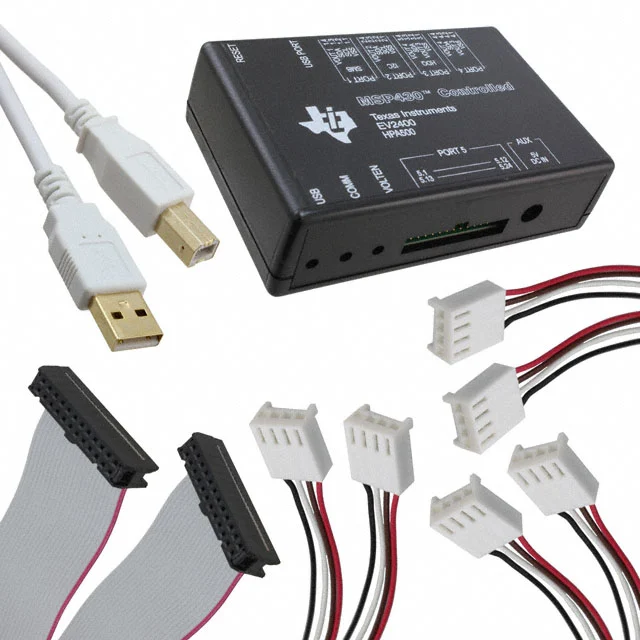
To help you make an informed decision quickly, this guide provides a comprehensive comparison of EV2400 (official TI version), EV2400 Panda (third-party compatible version), and EV2400 Pro (third-party enhanced version). Whether you’re a BMS engineer, a laptop or drone battery repair technician, or someone working on BQ chip diagnostics, you’ll find clear guidance here to choose the right EV2400 tool for your needs.
1. What is the EV2400 (Official), and What Can It Do?
The EV2400 is TI’s official USB-to-SMBus/I2C communication interface tool, designed to connect a PC to TI BQ series fuel gauge chips. Through a standard USB connection, it converts PC commands into SMBus/I2C signals, enabling stable communication with the battery management IC. This is why the EV2400 is often considered essential hardware when using bqStudio or other TI development tools.

1.1 Official Definition: Reliable USB → SMBus/I2C Bridge
Internally, the EV2400 uses TI’s own MSP430 microcontroller, providing reliable and consistent data transfer. Compared to third-party interfaces, the official EV2400 offers the most complete driver support and software compatibility, making it widely used in development labs, prototyping environments, and production-stage testing.
Key functions include:
Converting PC commands into SMBus/I2C signals recognizable by BQ chips
Providing stable communication timing, ensuring accurate register read/write operations
Seamlessly integrating with TI official software, including bqStudio
For any team developing TI-based battery management systems or performing precise battery parameter tuning, the EV2400 serves as the essential bridge between software and hardware.
1.2 Common Applications: Development, Testing, Programming, and Calibration
Because the EV2400 allows direct access to chip registers, it supports a wide range of practical applications, including:
Reading BQ fuel gauge registers (voltage, current, temperature, state of charge (SOC), cycle count, etc.)
Programming firmware and configuring parameters on BQ series chips
Performing battery calibration procedures (Pack, open-circuit voltage (OCV), temperature calibration)
Analyzing battery health (state of health, SOH) and cycle degradation
Unlocking or recovering “locked” or abnormal battery packs
Repairing and “reviving” batteries for laptops, drones, and power tools
2. EV2400 vs EV2400 Panda vs EV2400 Pro: Appearance & Hardware Differences
Here’s a comprehensive comparison table covering appearance, hardware, interfaces, firmware, power supply, and compatibility across different EV2400 models:
| Feature / Aspect | EV2400 (Official) | EV2400 Panda (Clone / Consumer Version) | EV2400 Pro (Third-Party Enhanced) |
|---|
| Image | 
| 
| 
|
| Manufacturer / Source | Texas Instruments (Official) | Small factories in China / Online sellers | Third-party manufacturers (often labeled “Pro/Plus”) |
| Form Factor / Size | Standard size, well-packaged PCB | Smaller, varied enclosures (transparent/plastic) | Larger, often metal case, more professional |
| Internal MCU | MSP430 series (official TI design) | Similar MCU, batch variations exist | Similar MCU + additional modules |
| Circuit Design | Strict TI reference design | Based on official design, components vary | Enhanced design on clone foundation |
| Output Interfaces | SMBus / I2C / HDQ | Mostly consistent with official | Some models add extra interfaces or pin headers |
| Power Supply | USB powered | USB powered (some simplified versions) | USB + built-in regulator or external power input |
| Firmware Version | Official, updatable via bqStudio | Inconsistent, varies by manufacturer | Usually modified third-party firmware |
| Driver Support | Full official drivers, highly reliable | Works but may encounter recognition issues | Drivers generally compatible, stability depends on vendor |
| bqStudio Compatibility | 100% compatible, all features supported | Mostly compatible, some chips/features may fail | Claimed enhanced support, actual depends on design |
| Register Read/Write Stability | Highly stable, precise timing | Occasional delays or dropouts | Stability depends on enhanced design quality |
| Firmware Flash Success Rate | High (official level) | Variable depending on manufacturer | Higher than Panda, but lower than official |
| Calibration Support | Full support (Pack, temperature, etc.) | Mostly supported, occasional issues | Claimed enhancements, depends on vendor |
| Build Quality & Materials | Premium, EMI-shielded | Inconsistent materials | Usually more robust than Panda |
| Documentation / Support | Complete official manuals & guides | No standardized support, limited documentation | Vendor-provided, variable transparency |
| Typical Price Range | Highest (official channels) | Cheapest (starting from ~$30) | Mid-to-high, depending on model |
| Target Users | BMS engineers, R&D teams, production lines | Battery repair shops, individual hobbyists | Professional repair, labs, semi-R&D use |
| Risk Factors | Minimal risk | Compatibility issues, inconsistent firmware | Vendor-defined, quality may vary |
| Overall Positioning | Most stable and safest professional-grade tool | Affordable and usable, but quality may vary | Enhanced features, depends on vendor reliability |
3. EV2400, Panda, and Pro: Features, Compatibility, and Use Cases
When choosing between EV2400, EV2400 Panda, and EV2400 Pro, the critical factors go beyond appearance or hardware. The main considerations are feature completeness, driver compatibility, and support for different battery management chips, particularly TI BQ series fuel gauge ICs. Here’s a detailed breakdown from a professional engineering perspective.
3.1 Official EV2400: Best Stability and Full Compatibility
The official EV2400, released by Texas Instruments, naturally excels in functionality and compatibility:
Target Users: Engineering teams, B2B manufacturing clients, and researchers who prioritize maximum stability, long-term maintenance, and official technical support.
3.2 EV2400 Panda (Clone): Affordable, but Compatibility May Vary
The EV2400 Panda, a consumer-oriented clone, is popular for its low cost, but its performance and stability vary by manufacturer and version.
Advantages
Significantly cheaper than the official version, ideal for low-budget or one-off projects
Easy to purchase via online marketplaces (e.g., Taobao, eBay, AliExpress)
Most basic functions work: SMBus/I2C communication, basic chip programming, and data monitoring
Potential Issues
Driver compatibility can be inconsistent, especially on newer Windows versions
Chip auto-recognition may be unstable, particularly for BQ40 series
Firmware is often outdated or non-upgradable
Build quality varies widely between manufacturers; wiring errors or signal instability are possible
Typical Use Cases
Target Users: Hobbyists, budget-conscious users, non-professional teams, and small workshops.
3.3 EV2400 Pro: Enhanced Features, Vendor-Dependent Performance
The EV2400 Pro is marketed as an “enhanced” version, but its features depend heavily on the vendor and require careful evaluation.
Common Enhancements
Built-in voltage regulator for stable communication without a real battery
Stronger SMBus drive capability for long cables or complex conditions
Additional external power inputs or multi-mode switching
Some versions claim support for a wider range of chips (verification recommended)
Risks
Not an official TI product; compatibility depends on third-party implementation
Vendor definitions of “Pro” vary; some only feature a metal case upgrade
Firmware is typically closed-source and may not be supported long-term
Typical Use Cases
Battery repair shops and service centers handling large volumes of battery packs
Reading/writing chips without a battery installed
Engineers needing extended functionality at moderate cost
Target Users: Small to medium repair centers, labs, and technical personnel working on large-scale battery pack testing.
3.4 Supported Chips and Compatibility Range
Across all EV2400 versions, the tools are primarily used with:
TI BQ Series Fuel Gauge Chips
Common series: BQ20Zxx, BQ30Zxx, BQ40Zxx
Supports battery pack configuration, calibration, and firmware programming
SMBus/I2C-Compatible Chips
HDQ Chips (Official EV2400 Has Best Support)
For projects relying on TI’s bqStudio toolchain, the official EV2400 or a high-quality Pro version is recommended to ensure reliable performance and full compatibility.
4. How to Choose the Right EV2400 Tool
Depending on your use case, the best choice among EV2400, EV2400 Panda, and EV2400 Pro varies. Whether you are doing engineering development, battery repair, or small-budget projects, the following three scenarios can help you quickly identify the most suitable version.
4.1 Engineering Development / Production / Official Support Needed
If your project requires stability, traceability, and long-term maintenance, or involves production workflows with the official toolchain, the official EV2400 is the only reliable choice. It offers maximum compatibility, complete documentation, and firmware/drivers continuously updated by Texas Instruments.
Recommended Use Cases and Reasons:
Long-term, stable communication tool for R&D or production
Deep integration with bqStudio (automatic chip recognition, calibration, production workflows)
Drivers that stay compatible with future Windows updates
Projects requiring official documentation and traceability
Standard lab, enterprise, or battery factory processes that demand official equipment
4.2 Hobbyists / Laptop & Drone Battery Repair / Budget-Friendly
For users with limited budgets or non-critical professional requirements, the EV2400 Panda (clone version) offers a cost-effective option. It is affordable and easy to purchase, but be prepared to handle potential driver or compatibility issues.
Recommended Use Cases and Reasons:
Personal repair of laptop, power tool, or drone batteries
Small workshops performing occasional BQ chip read/write
Limited budget, unwilling to purchase official EV2400
Willing to manually install drivers or troubleshoot compatibility issues
Basic use of bqStudio without strict feature requirements
4.3 Battery Shops / Users Needing Extra Power or Convenience
If you frequently deal with dead or low-voltage batteries, need to debug circuits often, or want more stable SMBus communication, a feature-enhanced EV2400 Pro (third-party enhanced) is better suited for professional repair environments.
Recommended Use Cases and Reasons:
Battery repair shops or technicians handling large volumes of “dead” batteries
Need a built-in voltage regulator to power BMS chips independently
Require stronger SMBus drive, additional interfaces, or a sturdier casing
Prefer easier wiring and reduced repetitive operations
Need extra cables, expansion ports, or debugging accessories
5. Purchasing & Practical Tips
For those who want to buy original EV2400 or high-quality Pro versions while ensuring compatibility and long-term reliability, Nantian Electronics is a trusted choice:
Sourced from Official Channels: Direct procurement from TI or authorized distributors ensures 100% genuine products
High Quality: Each device is strictly tested before shipment to ensure stable recognition in bqStudio and full support of official features
Professional Support: Technical guidance for drivers, cabling, and system compatibility
Applicable Scenarios: Suitable for R&D teams, repair centers, production lines, and battery labs
Choosing Nantian Electronics means not just buying a tool—it’s investing in a reliable, stable, long-term solution for BMS development and battery repair.
SHOP NOW