Start a lifecycle check with the exact manufacturer and orderable part number. Verify the status on the original component manufacturer's website, then review any Product Change Notification (PCN), Product Discontinuance Notice (PDN), or End-of-Life notice that affects the part. Record the source and review date. If the evidence conflicts, ask for written confirmation before making a last-time-buy, redesign, or sourcing decision.
A lifecycle label tells you how the manufacturer classifies the part. It does not confirm current distributor inventory, price, lead time, traceability, or suitability for a particular application. An Active part can still be difficult to buy, while an NRND part may remain available for existing designs.
Procurement and engineering teams need two decisions. First, establish the lifecycle status. Then decide whether to continue buying, qualify an alternate, plan a controlled lifetime purchase, or source an obsolete part with added documentation and inspection requirements.
Quick answer: how to check electronic component lifecycle status
Use this five-step check for one part:
Confirm the original component manufacturer and the full orderable part number. Include suffixes that identify package, grade, or packing configuration.
Search the manufacturer's product page. Capture the displayed status, page URL, and date checked.
Search the manufacturer's PCN, PDN, EOL, or discontinuance-notice records for the same orderable part number.
Record any last-time-buy date, last-time-ship date, affected ordering code, and manufacturer-named replacement.
Choose the next action based on evidence. Continue monitoring an Active part, avoid NRND parts in new designs, plan around an EOL window, or start a controlled obsolete-part sourcing and alternate review.
Do not stop at a distributor or component-database label if the decision could affect production. Those sources can help locate records, but the current manufacturer page and the latest dated manufacturer notice should anchor the decision. If neither source is clear, request written confirmation from the manufacturer, an authorized channel, or the supplier handling the RFQ.
Understand lifecycle labels before you act
Manufacturers do not use one universal set of labels. Texas Instruments uses Preview, Active, NRND, Last Time Buy, and Obsolete. NXP uses Development, Qualification, Active, NRND, EOL, and No Longer Manufactured. Renesas separates EOL-notified from EOLed products. Read the definition published by the manufacturer whose part you are checking.
| Common label | Practical meaning | What the buyer should verify |
|---|
| Active, Production, or Mass Production | The manufacturer classifies the part as a current production product. | Confirm the exact ordering code, datasheet revision, package, and present availability. Active does not mean that every channel has stock or a short lead time. |
| NRND, Not Recommended for New Designs, or Non-Promotion | The part may remain available for existing users, but the manufacturer does not recommend adopting it in a new design. | Ask whether an alternate is recommended, check ongoing demand, and assess redesign timing. NRND is not automatically the same as obsolete. |
| EOL, EOL-notified, or Last Time Buy | The manufacturer has started a discontinuance process, often with a final order window. | Find the formal notice and record the last-time-buy and last-time-ship dates. Confirm which orderable variants are affected. |
| Obsolete, Discontinued, EOLed, or No Longer Manufactured | Normal production or order acceptance has ended under the manufacturer's policy. | Decide whether to redesign, qualify an alternate, or source remaining material with appropriate documentation and inspection controls. |
Consult the official TI product lifecycle definitions, NXP product lifecycle definitions, or Renesas product lifecycle policy before mapping a label into your internal BOM status.
An EOL label also needs a date. A part can be inside a last-time-buy window, past the final order date but awaiting final shipments, or fully unavailable from the original manufacturer. Those positions require different purchasing and engineering responses.
Verify lifecycle status step by step
1. Normalize the exact part identity
Start with the original component manufacturer and the full orderable manufacturer part number. Do not rely on a shortened family name, house code, top marking, or customer description. A suffix may identify a different package, temperature grade, qualification level, packing method, or revision, and the affected variants in a discontinuance notice may not cover the whole family.
Match the part number against the current manufacturer datasheet or ordering table. If the label, BOM, and datasheet use different strings, resolve the difference before checking status.
2. Check the manufacturer's current product page
Search the manufacturer's site for the exact number and find the lifecycle field. Save the URL and the date checked. If the page displays a family-level status and an orderable-device table, review both.
3. Search for product notices
Look for PCNs, PDNs, EOL notices, discontinuance notices, and product alerts that name the exact orderable code. A PCN usually announces a product or process change. A PDN or discontinuance notice addresses the end of production and should state the affected parts and relevant dates.
TI describes the expected contents of a notice on its product change notification page. Analog Devices also explains where it publishes PCNs and PDNs and which fields they contain in its quality management guidance.
4. Capture dates and affected ordering codes
Record the notice publication date, last-time-buy date, last-time-ship date, affected orderable numbers, and any manufacturer-listed replacement. Do not assume that a last-time-buy period is still open because an old distributor page shows EOL.
5. Check an alternate without assuming compatibility
A manufacturer-listed successor is a starting point, not proof of form, fit, function, or qualification equivalence. Engineering should compare electrical limits, pinout, package, footprint, timing, firmware impact, thermal behavior, compliance needs, and application requirements using the current datasheets.
6. Save a dated evidence record
Use a simple log that another buyer or engineer can audit:
| Field | Record |
|---|
| Manufacturer | Original component manufacturer |
| Full orderable part number | Exact MPN including applicable suffixes |
| Current lifecycle label | Manufacturer's wording |
| Product page | URL and date checked |
| Notice | PCN, PDN, EOL, or discontinuance number and URL |
| Notice dates | Publication, last-time-buy, and last-time-ship dates if stated |
| Affected variant | Exact ordering code listed in the notice |
| Proposed action | Monitor, continue for existing design, lifetime buy review, alternate qualification, redesign, or obsolete sourcing review |
| Owner and next review | Named function and planned review trigger |
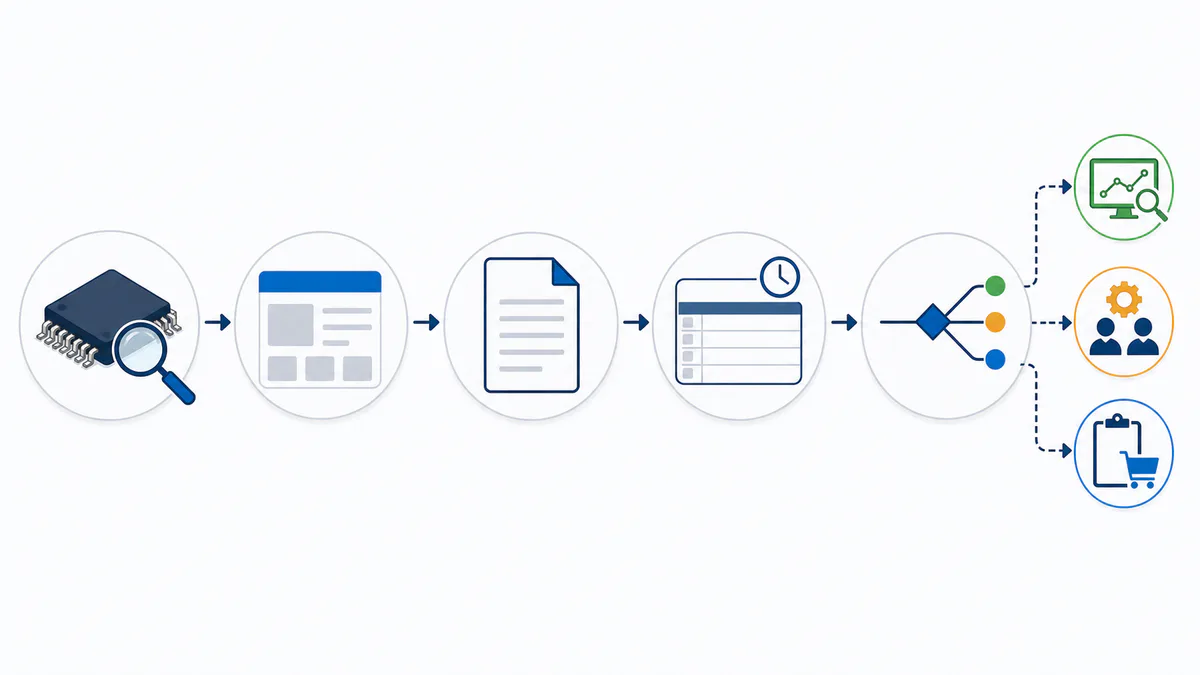 Verify the exact part, check the manufacturer source and notices, record the evidence, then assign the next action.
Use the most reliable source for each check
Choose the source that can answer the specific question. Do not treat every database field as equivalent.
| Source | Best use | Limitation |
|---|
| Latest dated manufacturer PDN, EOL, or discontinuance notice | Confirm affected orderable parts, final-order dates, final-shipment dates, and stated replacements | The notice may be hard to find or may require a portal search. |
| Current manufacturer product page | Check the lifecycle label and current ordering information | Family pages may not make every orderable variant equally visible. |
| Manufacturer PCN/PDN search or notification subscription | Find and monitor formal changes | Registration or part-list setup may be required. |
| Authorized distribution channel or manufacturer representative | Clarify an unclear status and current commercial path | The answer should still identify the source and exact part number. |
| Component database or BOM intelligence platform | Screen many parts, collect links, and flag status changes | Normalized labels can hide manufacturer-specific terms or stale source data. |
| Marketplace or search-result listing | Discovery only | Listings may persist after production ends and do not establish manufacturer status. |
Renesas, for example, provides a PCN/PDN search tool. Other manufacturers often place notices under the documentation or quality tab on each product page.
For one high-risk part, verify the manufacturer page and notice directly. For a large BOM, use a lifecycle platform or supplier report to find candidates, then send high-impact items through primary-source review.
How to resolve conflicting lifecycle records
Conflicts usually come from different update dates, mismatched ordering codes, or normalized labels. Resolve them in this order:
Compare the manufacturer name and full orderable part number in every record.
Check whether one source refers to the product family while another refers to a package or ordering variant.
Compare dates. A newer manufacturer notice may supersede an older product page or database record.
Read the notice attachment, not only its title. Confirm that the exact part appears in the affected-parts list.
Ask for written clarification if the difference changes a purchase, lifetime-buy, qualification, or redesign decision.
Keep the conflicting records in the evidence log. Do not silently replace the earlier value. A useful entry states: "Database shows NRND; manufacturer product page shows Active; no matching PDN found; confirmation requested on [date]."
An unknown status needs manual review. Do not classify it as Active. If the manufacturer page is missing, the part number is unrecognized, or the notice cannot be tied to the exact ordering code, move the item into a review queue. Procurement can keep gathering commercial information, but engineering and quality teams should not make a lifecycle-sensitive decision from an unsupported label.
Match the lifecycle status to the right action
Assign an owner and next action to every verified status.
| Verified status | Procurement action | Engineering and quality action | Urgency |
|---|
| Active | Confirm current availability, lead time, approved source, and demand coverage. | Keep the datasheet and approved-part record current. Review single-source or long-product-life exposure. | Routine monitoring based on product risk. |
| NRND | Avoid treating the part as a default choice for new demand. Ask about continued supply and a recommended successor. | Do not adopt it in a new design without a documented exception. Start alternate comparison for long-life products. | Plan before a formal discontinuance limits the options. |
| EOL or Last Time Buy | Record final-order and final-shipment dates. Forecast remaining demand and review the commercial terms of any lifetime purchase. | Qualify an alternate or redesign path. Review storage life, handling, compliance, and excess-inventory risk before approving a lifetime buy. | Date-driven. Work backward from the manufacturer's notice. |
| Obsolete or No Longer Manufactured | Check approved sources, remaining material, documentation requirements, quantity, and target date. | Decide whether obsolete sourcing, repair support, or redesign is justified. Define inspection and acceptance requirements before purchase. | Project-specific, often high when production or repair demand remains. |
| Unknown or conflicting | Hold the lifecycle decision open and request source evidence. | Review the exact MPN and escalate to manufacturer or supplier confirmation. | High if a purchase or design release depends on it. |
The lifecycle label is one input to the decision. A lifetime buy can introduce storage, cash, forecast, and quality risk. An alternate can create electrical, mechanical, firmware, validation, or regulatory work. Obsolete sourcing can keep a repair or production requirement moving, but the source, documentation, handling, inspection scope, and application risk need review.
If the verified status is EOL or obsolete and demand remains, prepare the evidence and submit the exact requirement through an electronic component request for quote. Availability, pricing, and lead time should be confirmed through the RFQ.
Check lifecycle risk across a BOM
Checking one part solves the immediate question. Adding the same evidence fields to the BOM makes the result repeatable.
Add these fields to the approved-parts or BOM record:
Original component manufacturer.
Full manufacturer part number and approved alternates.
Manufacturer lifecycle label.
Status source URL and date checked.
Latest PCN, PDN, or EOL notice number.
Last-time-buy and last-time-ship dates when applicable.
Product usage, annual demand, on-hand balance, and open orders.
Single-source, qualification, compliance, and redesign flags.
Owner, decision, and next review trigger.
Prioritize the BOM by business impact, not alphabetical order. Start with single-source ICs, programmable devices, custom or safety-related components, parts already marked NRND, long-lead items, and components used across several assemblies. Generic passives with several approved sources may need a different review depth from a sole-source processor or power module.
Set monitoring triggers that match the product. Review before a design release, sourcing event, production ramp, long-term service commitment, and scheduled BOM health check. Subscribe to manufacturer PCN/PDN notices where the option exists. The right cadence depends on component criticality, product life, demand, and change cost; one interval does not fit every BOM.
For large lists of electronic components, an automated lifecycle or BOM-intelligence tool can flag changes and collect source links. Keep a manual verification path for high-impact parts and any record that is unknown, stale, or contradictory.
When a part is EOL or obsolete, control the sourcing decision
An EOL or obsolete result does not show whether a particular lot should be purchased. Procurement, engineering, and quality teams still need to review the demand, source, lot, and application.
Before a lifetime buy, compare the remaining product or service demand with inventory, open orders, forecast uncertainty, storage conditions, shelf-life or handling concerns, financing cost, and the time needed to qualify an alternate. Use the manufacturer's final-order date as a constraint, not as a reason to place an unsupported quantity.
When normal manufacturer supply has ended, review the proposed source and lot in more detail:
Confirm the manufacturer and full orderable part number.
Ask for photos of labels, packaging, and part markings when appropriate.
Define acceptable date-code, lot-code, packaging, and documentation conditions.
Discuss traceability expectations and what evidence can actually be supplied.
State the required quantity, target date, split-delivery needs, and application risk.
Agree on inspection or testing requirements before purchase when the application or source risk warrants them.
Retain the lifecycle evidence, quotation, supplier documents, inspection record, and disposition decision.
No single visual check proves that a component is authentic or suitable. Inspection depth should follow the part, source, value, application, and customer requirements. NTCHIP's quality control page provides a starting point for discussing inspection and documentation, but the specific scope must be confirmed for the RFQ and lot.
If an alternate is proposed, do not approve it from a cross-reference table alone. Engineering should compare the current datasheets and validate any form, fit, function, firmware, thermal, regulatory, reliability, and application differences before release.
Prepare an obsolete-component RFQ
A complete RFQ helps the sourcing team distinguish an exact requirement from a family-level inquiry. Include the evidence you already collected.
| RFQ field | What to provide |
|---|
| Manufacturer | Original component manufacturer, not only a brand printed on a BOM description |
| Full part number | Exact orderable MPN with suffixes |
| Quantity | Required quantity and acceptable shipment splits |
| Target date | Required delivery date or production schedule |
| Lifecycle evidence | Manufacturer status, source URL, notice number, and date checked |
| Package and grade | Package, temperature grade, qualification level, or other controlled attributes |
| Date and lot requirements | Acceptable date-code range, lot consistency, or lot restrictions if applicable |
| Documentation | Required traceability, COC, photos, test reports, or other records, subject to availability and review |
| Inspection scope | Visual, X-ray, electrical, or other agreed checks where justified |
| Application context | New production, repair, MRO, service stock, redesign bridge, or lifetime-buy support |
| Alternate policy | Whether alternates are allowed and who must approve them |
Attach the applicable datasheet and manufacturer notice if your team has them. If an exact suffix is uncertain, show the BOM entry, part photos, package, and known specifications, then mark the identification as unresolved.
Submit the requirement through NTCHIP's RFQ page. The sourcing team can review options after receiving the full part number and requirements. Availability, pricing, lead time, documentation, and inspection scope should be confirmed for the specific quote.
How NTCHIP can support a lifecycle-risk requirement
NTCHIP is an independent electronic component distributor and sourcing partner. For an EOL, obsolete, or hard-to-find requirement, the team can review sourcing options after the buyer supplies the exact manufacturer part number, quantity, target date, lifecycle evidence, documentation needs, and inspection requirements.
Each RFQ still needs a part-specific review. A lifecycle status does not establish current availability, and a source listing does not establish suitability. Confirm pricing, lead time, lot information, documentation, and any proposed inspection scope during the quotation process.
If your team is still resolving the suffix, package, or status evidence, contact NTCHIP with the BOM line, datasheet, notice, and photos you have. Mark any uncertain field clearly so the sourcing review begins with the correct identification problem.
Frequently asked questions
Is NRND the same as obsolete?
No. NRND usually means the manufacturer does not recommend the part for new designs, while existing users may still be able to order it. Obsolete or No Longer Manufactured normally means original production or order acceptance has ended. Check the manufacturer's own definition and any dated discontinuance notice.
Is EOL the same as obsolete?
Not always. EOL may describe a discontinuance process that still has a last-time-buy or last-time-ship window. Obsolete may describe the later state after normal production has ended. Manufacturers use these labels differently, so capture the notice dates and exact affected part numbers.
Can an Active component still be hard to buy?
Yes. Active is a manufacturer lifecycle classification, not an inventory guarantee. Allocation, demand, manufacturing cycles, regional availability, minimum order quantities, or channel conditions can still affect supply. Confirm availability, pricing, and lead time through an RFQ.
What is the difference between a PCN and a PDN?
A PCN generally announces a product or process change that may require customer review. A PDN announces product discontinuance and commonly identifies affected parts, the reason, final-order dates, final-shipment dates, and a replacement when one is offered. Read the manufacturer's notice policy and the actual notice because document names and fields vary.
What if I cannot find the part on the manufacturer's website?
First, verify the manufacturer and full orderable part number against the label, BOM, and datasheet. Search archived product and notice pages. Then request written confirmation from the manufacturer, an appropriate authorized channel, or the supplier handling the requirement. Keep the status as unknown until the evidence supports a lifecycle decision.
Use risk-based triggers instead of one universal interval. Review before a design release, major purchase, production ramp, long-term service commitment, and planned BOM health check. Monitor single-source, NRND, EOL, high-impact, and expensive-to-redesign parts more closely than low-risk parts with several approved sources.
Does a manufacturer-named replacement guarantee drop-in compatibility?
No. Treat it as a candidate. Engineering should compare current datasheets and validate electrical ratings, package, pinout, footprint, timing, firmware, thermal behavior, qualification, compliance, and application requirements before approval.
Check the evidence before the next purchase
An electronic component lifecycle check should leave a dated evidence trail: exact manufacturer, full orderable part number, manufacturer status, product-page URL, applicable notice, affected variant, final-order dates, and assigned action. That record gives procurement, engineering, and quality teams the same basis for a buy, redesign, alternate qualification, or sourcing review.
If the part is EOL, obsolete, or hard to find, send the manufacturer, full part number, quantity, target date, lifecycle evidence, documentation needs, and inspection requirements through the NTCHIP RFQ page. Availability, pricing, lead time, and the proposed sourcing scope will need confirmation for the specific requirement.