Introduction
Think of computer memory in terms of transportation: SRAM (Static Random Access Memory) is like a Formula 1 car—blazing fast and precision-engineered, but incredibly expensive and with limited seating. DRAM (Dynamic Random Access Memory), on the other hand, is like a double-decker bus—slower and far more economical, but capable of carrying a massive amount of passengers. While both serve as the backbone of data storage, their mechanics differ fundamentally: SRAM holds data "statically" using complex flip-flop circuits as long as power is supplied, whereas DRAM relies on capacitors that leak charge and must be "dynamically" refreshed thousands of times per second.
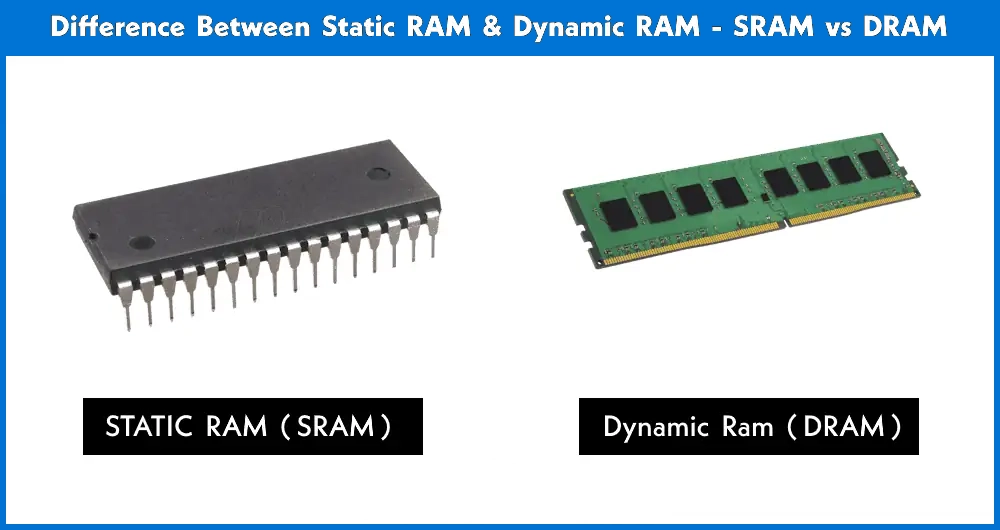
Whether you are studying computer architecture or selecting hardware for a new build, understanding the trade-offs between these two is essential. In this guide, we will break down the critical battle of SRAM vs DRAM, comparing their speed, cost, physical structure, and real-world use cases to help you understand why your CPU cache relies exclusively on one, while your main system memory depends entirely on the other.
What is SRAM? (Static Random Access Memory)
SRAM, or Static Random Access Memory, is a type of semiconductor memory that excels in high-speed data processing. The term "Static" refers to the way it handles data: once a bit is written to an SRAM cell, it stays there as long as the device has power. Unlike its counterpart, DRAM, it does not require a "refresh cycle" to keep its contents intact, which eliminates the latency associated with constant recharging.
Technologically, SRAM is built using a Flip-Flop configuration. While there are various designs, the most common is the 6T SRAM cell, which uses six individual transistors to store a single bit of data. This transistor-only architecture is what makes it incredibly fast, as it allows for near-instantaneous access to data. However, there is a physical trade-off: because it takes six transistors to store just one bit, SRAM has a very low density. This means it takes up a significantly larger amount of "real estate" on a silicon chip compared to other memory types, making it both physically bulky and expensive to manufacture in large capacities.
Key Characteristics of SRAM:
Blazing Fast Speed: Offers the lowest latency of any RAM type, often operating at the same speed as the processor.
High Power Consumption (Active): While it uses less power when idle, its complex circuitry consumes significant energy when being accessed at high frequencies.
Low Storage Density: Due to its 6-transistor structure, you cannot pack much SRAM into a small area.
High Cost: Because it occupies more space on the silicon wafer, the cost per gigabyte is exponentially higher than DRAM.
What is DRAM? (Dynamic Random Access Memory)
DRAM, which stands for Dynamic Random Access Memory, is the most common type of memory found in modern computing devices, from smartphones to high-end servers. The "Dynamic" in its name is a literal description of its operation: unlike SRAM, the data in DRAM is unstable and will quickly fade away unless it is refreshed thousands of times per second. This constant "refresh cycle" is necessary because of how the memory is physically constructed.
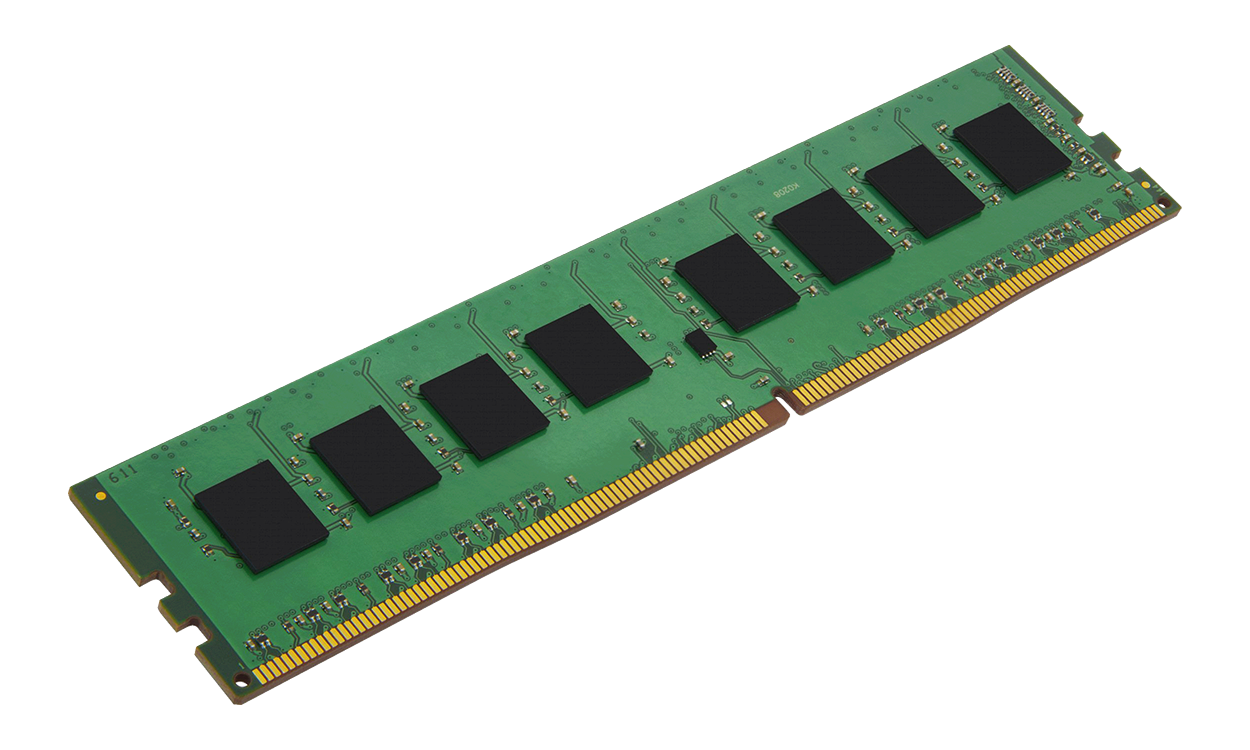
At its architectural core, DRAM utilizes a remarkably simple design known as the 1T1C structure—meaning it uses just one Transistor and one Capacitor to store a single bit of data. The capacitor acts like a tiny bucket holding an electrical charge (representing a '1' or a '0'). However, these "buckets" have microscopic leaks. To prevent data loss, the memory controller must periodically read and rewrite the data back into the capacitors. This simplicity is DRAM’s greatest strength and its primary weakness: because it only needs two components per bit, it offers extremely high density and low cost, but the overhead of refreshing and the physics of charging capacitors make it significantly slower than SRAM.
Key Characteristics of DRAM:
High Storage Density: The 1T1C design allows manufacturers to pack billions of cells into a single, compact chip, enabling the multi-gigabyte RAM sticks we use today.
Cost-Effective: Because it uses less silicon "real estate" per bit, DRAM is significantly cheaper to produce than SRAM, making large-scale system memory affordable.
Moderate Speed: While still fast, DRAM is much slower than the CPU’s internal speed due to the time required to charge capacitors and manage refresh cycles.
High Latency: The need for constant refreshing and complex access protocols results in higher latency compared to the near-instantaneous SRAM.
SRAM vs DRAM: The Core Differences
When comparing SRAM vs DRAM memory, the choice isn't about which is "better," but rather which is right for a specific task. Their differences in architecture lead to massive variations in performance, price, and efficiency.
Speed and Performance
In the world of computing, speed is measured in nanoseconds (ns), and the gap between these two is vast. SRAM is significantly faster, with access times typically ranging from 1 to 10 nanoseconds. This near-instantaneous response is possible because SRAM doesn't have a "refresh cycle."
DRAM, conversely, has access times usually between 50 and 100 nanoseconds. Because DRAM must constantly stop to refresh its capacitors, the processor often has to wait for the memory to be "ready" before data can be read or written. This is why SRAM is the gold standard for tasks that require immediate data retrieval.
Cost and Density
The "Cost per bit" is where DRAM vs SRAM becomes a lopsided fight. DRAM is incredibly cheap because of its simple 1T1C (one transistor, one capacitor) design. This simplicity allows for high storage density, meaning you can cram 16GB of DRAM onto a tiny stick of RAM.
SRAM is physically "bulky." Since it requires 6 transistors to store a single bit, it takes up about 6 to 10 times more silicon space than DRAM for the same amount of data. This makes SRAM exponentially more expensive to produce in large capacities. While you might pay a few dollars for gigabytes of DRAM, the same amount of SRAM would cost thousands.
Power Consumption: Idle vs. Active
Power usage is a nuanced topic when discussing sram vs dram memory.
SRAM is highly efficient when idle because it doesn't need to refresh. However, when operating at high frequencies (like in a CPU cache), it can generate significant heat and consume more power.
DRAM consumes power consistently because it must power the refresh circuitry, even when the computer is doing nothing.
Expert Tip: In mobile devices like your smartphone, this power dynamic is crucial. Designers use DRAM for your running apps to save cost and space, but they rely on the "static" nature of SRAM in low-power standby modes to preserve critical system data with minimal battery drain.
Volatility
It is a common misconception that one is "more permanent" than the other. In reality, both SRAM and DRAM are volatile memory. This means that as soon as the power is cut, all stored information is lost. The difference lies solely in how they maintain data while powered on: SRAM is stable as long as electricity flows, while DRAM is "leaky" and requires constant management to keep its data alive.
Comparison Table: SRAM vs DRAM at a Glance
To help you quickly decide which memory type fits your needs, here is a side-by-side comparison of SRAM vs DRAM. This table summarizes the technical trade-offs that define modern computing architecture.
| Feature | SRAM (Static RAM) | DRAM (Dynamic RAM) |
|---|
| Speed | Blazing fast (1–10 ns) | Slower (50–100 ns) |
| Structure | Complex (6 Transistors per bit) | Simple (1 Transistor + 1 Capacitor) |
| Refresh Requirement | None (Static) | Constant (Dynamic Refresh) |
| Storage Density | Low (Takes up more space) | High (Highly compact) |
| Cost | Very High | Low / Affordable |
| Power Consumption | Low when idle; High when active | Constant (due to refresh cycles) |
| Typical Usage | CPU Cache (L1, L2, L3) | Main System RAM, Video RAM |
Why These Differences Matter
As you can see from the table above, the choice between SRAM vs DRAM memory is a balance of physics and economics.
SRAM is utilized where latency is the enemy. This is why it lives inside the CPU. If your processor had to wait for DRAM every time it needed a simple instruction, your computer would feel incredibly sluggish.
DRAM is utilized where capacity is the goal. Since modern operating systems and games require gigabytes of data to be stored simultaneously, the high density and low cost of DRAM make it the only practical choice for system memory.
In this section, we bridge the gap between theory and reality. Understanding the practical applications of SRAM vs DRAM memory helps explain why your devices are built the way they are.
Real-World Use Cases: Where Do They Live?
Because of the massive difference in cost and performance, engineers use a "Memory Hierarchy" strategy. They place a small amount of fast memory (SRAM) close to the action and a large amount of slower memory (DRAM) further away.
Where is SRAM Used?
SRAM is reserved for critical paths where every nanosecond counts. If a processor has to wait for data, it wastes "clock cycles," making the entire system feel slow.
CPU Cache (L1, L2, L3): This is the most famous use of SRAM. Modern processors have three levels of cache. L1 is the smallest and fastest (SRAM), sitting right inside the CPU core to provide immediate instructions.
Hard Drive & SSD Buffers: High-speed buffers in storage drives use SRAM to temporarily hold data before it is written to the slower flash memory or magnetic platters.
Networking Gear: High-end routers and switches use SRAM for packet buffering and look-up tables to maintain gigabit speeds without bottlenecks.
Where is DRAM Used?
DRAM is the "workhorse" of your computer. It handles the heavy lifting where you need to store gigabytes of active data without spending thousands of dollars.
Main System Memory (RAM): Those sticks of DDR4 or DDR5 memory you plug into your motherboard are all DRAM. They hold your operating system, open Chrome tabs, and running applications.
Graphics Memory (VRAM): Your GPU uses a specialized, high-bandwidth version of DRAM called GDDR6 or GDDR7. While faster than standard system RAM, it is still dynamic memory at its core.
Smart Devices: Everything from your smart TV to your microwave’s control panel uses DRAM to manage its user interface and basic functions.
Why Can’t We Use SRAM for Everything?
It’s a common question: If SRAM is so much faster, why not use 16GB of SRAM as my main RAM?
The answer comes down to two deal-breakers: Physical Size and Cost.
Size: To have 16GB of SRAM, your motherboard would need to be the size of a dinner table just to fit the billions of transistors required.
Cost: 16GB of DRAM costs roughly $50–$100. A 16GB "stick" of SRAM (if it were even possible to manufacture) would cost as much as a luxury car.
By combining both—using SRAM for the "thinking" (Cache) and DRAM for the "memory" (System RAM)—we get the best of both worlds: high speed and massive capacity at a reasonable price.
Pros and Cons Summary
To help you weigh your options or prepare for your next technical discussion, here is a concise summary of the advantages and disadvantages of SRAM vs DRAM memory.
SRAM (Static RAM)
SRAM is the "performance king," but its excellence comes at a premium.
Pros:
Blazing Speed: The fastest memory available, matching the speed of modern processors.
Simplicity of Use: Does not require complex refresh circuitry, making it easier to implement in small-scale logic.
High Reliability: Since it doesn't rely on charging/discharging capacitors, data access is more stable.
Cons:
Extremely Expensive: The cost per megabyte is much higher than any other RAM type.
Low Storage Density: Physically large; you cannot pack much capacity into a small chip.
High Active Power: While it uses less power at rest, it consumes significant energy when accessed at high frequencies.
DRAM (Dynamic RAM)
DRAM is the "economic workhorse" that makes modern computing affordable for everyone.
Pros:
Massive Capacity: Its high-density 1T1C structure allows for the gigabytes of RAM required by modern OSs.
Inexpensive: The lowest cost per bit among all types of volatile memory.
Simple Hardware Architecture: Allows for massive integration on a single silicon die.
Cons:
Latency Issues: Significantly slower than SRAM due to access protocols and refresh cycles.
Requires Constant Refreshing: Needs additional "refresh circuitry" to prevent data from leaking away.
Design Complexity: Requires a sophisticated memory controller to manage the timing of data retrieval and recharging.
Final Expert Summary
If you are designing a system where low latency is the top priority (like a CPU), SRAM is your only choice. However, if you need high capacity to run complex software and keep costs under control, DRAM is the undisputed winner. In most modern devices, these two work in a perfect hierarchy to give you a fast, responsive, and affordable experience.
Frequently Asked Questions (FAQ)
1. Is SRAM faster than DRAM?
Yes, significantly. SRAM is much faster because it uses a transistor-based flip-flop design that allows for near-instantaneous data access (1–10 nanoseconds). DRAM is slower (50–100 nanoseconds) because it relies on capacitors that take time to charge and discharge, and it must constantly pause to "refresh" its data.
2. Why can't I use SRAM as my main computer RAM?
There are two main reasons: cost and size. If your 16GB of system RAM were made of SRAM, the memory module would be physically massive—likely too big to fit inside a standard PC case. Furthermore, it would cost thousands of dollars, making a standard laptop or desktop unaffordable for the average consumer.
3. Which one is "volatile" memory, SRAM or DRAM?
Both are volatile. This is a common point of confusion. Whether it is the high-speed SRAM in your CPU cache or the DRAM sticks on your motherboard, both require a constant power supply to hold data. As soon as you turn off your device, the data in both types of memory is lost.
4. Why does DRAM need to be "refreshed"?
DRAM stores data in tiny capacitors that act like leaky buckets. Because these capacitors naturally lose their electrical charge over time, the memory controller must "refill" (refresh) them thousands of times per second. If it didn't, the electrical charge representing your data would disappear, and the information would be corrupted.
5. Which is better for gaming, SRAM or DRAM?
They serve different purposes in gaming. Your CPU Cache (SRAM) ensures the game's logic and physics calculations run smoothly without lag. However, your System RAM and Video RAM (DRAM) are what allow the game to load massive open-world maps and high-resolution textures. You need a high-quality balance of both to have a great gaming experience.